The web is becoming more than a place where people read pages, click buttons, and fill out forms. AI assistants and autonomous agents are increasingly able to search websites, interpret information, use tools, complete workflows, and interact with digital services
That creates a new website requirement:
your website should be understandable not only to humans and search engines, but also to AI agents.
This is where agent friendly websites come in.
An agent-friendly website is designed so that software agents can understand its content, identify important information, navigate its structure, recognize available actions, and interact with supported functionality without unnecessary friction.
This does not mean designing a website exclusively for artificial intelligence. Instead, it means building a website with clean information architecture, semantic HTML, accessible interfaces, structured data, predictable URLs, clear content, reliable APIs, strong security, and well-defined actions.
In other words, good AI agent optimization often starts with doing the fundamentals of web development correctly.
As AI agents become more capable, businesses that make their websites easier for machines to understand can create better opportunities for discovery, automation, customer service, and digital transactions.
What Are Agent Friendly Websites?

Agent friendly websites are websites designed to be easily interpreted and interacted with by AI agents, automated systems, search technologies, and other machine-based interfaces.
Traditional website optimization generally focuses on three audiences:
- Human visitors
- Search engines
- Accessibility technologies
The emerging web adds another important audience:
- AI agents
An AI agent may need to perform tasks such as:
- Find a product.
- Compare prices.
- Check availability.
- Read company information.
- Locate a service.
- Complete a form.
- Book an appointment.
- Retrieve information from an API.
- Navigate through a website.
- Submit structured information.
- Determine which action should be performed next.
If your website hides important information inside complicated interfaces, relies heavily on visual interpretation, uses ambiguous buttons, or provides no structured way to access important functionality, an agent may struggle.
An agent-friendly website reduces that unnecessary complexity.
A Simple Example
Imagine an online store selling laptops.
A human visitor may easily understand:
Laptop A — $899
16GB RAM
512GB SSD
In Stock
Buy Now
An AI agent needs to understand the same information as distinct pieces of data:
| Information | Machine-readable meaning |
|---|---|
| Product name | Laptop A |
| Price | 899 USD |
| RAM | 16GB |
| Storage | 512GB SSD |
| Availability | In stock |
| Product URL | Specific product page |
| Action | Purchase |
The more clearly your website communicates these relationships, the easier it becomes for software to interpret the page.
Why Agent Friendly Websites Matter in 2027?
The traditional search journey looks something like this:
User → Search Engine → Website → Information
The emerging agentic journey can look more like:
User → AI Agent → Search/Tools/Websites → Information → Action
That difference is significant.
Instead of asking an AI assistant:
“What laptops are available?”
a user may increasingly ask:
“Find me a laptop under $1,000 with 16GB RAM and at least 512GB storage.”
An agent may need to discover websites, interpret product information, compare options, and potentially interact with available systems. This means websites increasingly need to expose information and functionality clearly.
AI agent optimization therefore goes beyond traditional keyword optimization.
It includes:
- Clear information architecture.
- Structured content.
- Machine-readable data.
- Semantic HTML.
- Accessible forms.
- Descriptive links.
- Stable URLs.
- APIs.
- Authentication boundaries.
- Explicit actions.
- Reliable error handling.
- Security controls.
- Fast page delivery.
Agent Friendly Websites vs Traditional Websites

The difference is not that one website is “for AI” and another is “for humans.”
Instead, an agent-friendly website makes its existing information and functionality easier for multiple types of users and technologies to understand.
| Website characteristic | Traditional approach | Agent-friendly approach |
|---|---|---|
| Content | Primarily visual | Visual + structured |
| Navigation | Visual menus | Clear semantic navigation |
| Buttons | “Click here” | Descriptive actions |
| Forms | Visual fields | Proper labels and predictable inputs |
| Product information | Text/images | Structured product data |
| Services | Marketing copy | Clear descriptions and actions |
| URLs | Sometimes complex | Stable and descriptive |
| Data | HTML only | HTML + structured data/API |
| Errors | Generic messages | Clear machine-readable responses |
| Accessibility | Optional consideration | Built into interface design |
| APIs | Limited | Available where useful |
| Security | Human-focused | Human + agent-aware |
| Actions | Hidden in UI | Explicitly defined |
The goal is to combine good design with good machine interpretation.
1. Build a Clear Website Information Architecture
The first step toward creating agent friendly websites is creating a logical structure.
AI systems need context.
If your website contains hundreds of pages without clear relationships, determining what information belongs where becomes more difficult.
Use a logical hierarchy. For example:
Homepage
│
├── Services
│   ├── Web Development
│   ├── SEO
│   ├── Graphic Design
│   └── Video Editing
│
├── About
├── Portfolio
├── Blog
│   ├── SEO
│   ├── Web Development
│   └── AI
│
└── Contact
This structure helps users navigate the website while also providing clearer relationships between pages.
Use Descriptive URLs
Prefer:
/example.com/services/web-development/
over:
/example.com/page?id=2847
Descriptive URLs provide contextual information before an agent even reads the page.
2. Use Semantic HTML
Semantic HTML is one of the most practical foundations for agent friendly websites. Instead of building everything with generic <div> elements, use HTML elements according to their meaning.
Examples include:
<header>
<nav>
<main>
<article>
<section>
<aside>
<footer>
<form>
<button>
Semantic markup helps browsers, accessibility technologies, developers, and automated systems understand the purpose of different parts of a webpage.
For example:
<button>Buy Now</button>communicates more clearly than:
<div class="button">Buy Now</div>The second element may visually look like a button, but its semantic meaning is weaker.
Good AI agent optimization therefore overlaps heavily with good accessibility and standards-based development.
3. Make Navigation Predictable
An AI agent should not need to guess how your website works. Use familiar navigation patterns.
For example:
- Home
- Products
- Services
- Pricing
- About
- Contact
- Documentation
- Support
Avoid unnecessarily creative navigation labels.
Instead of:
“Discover Our Digital Universe”
use:
“Services”
Creative copy can still be used elsewhere. Navigation should prioritize clarity.
4. Create Machine-Readable Content
One of the most important principles behind agent friendly websites is making important information available in structured formats.
For example, a restaurant website might display:
Italian Restaurant
Lahore
Open 11 AM–11 PM
Phone: +92 XXX XXXXXXX
Structured information can additionally describe:
- Business name
- Address
- Telephone
- Opening hours
- Cuisine
- Reviews
- Menu
- Location
- Services
Structured data helps machines interpret relationships between pieces of information.
Schema.org is particularly useful for this purpose.
5. Use Structured Data Strategically
Structured data should describe information that actually exists on the page.
Depending on the website, useful schema types may include:
- Organization
- LocalBusiness
- Product
- Service
- Article
- BlogPosting
- BreadcrumbList
- FAQPage
- Event
- WebSite
- Person
- Review
For example, a product page might contain:
{
  "@context": "https://schema.org",
  "@type": "Product",
  "name": "Example Laptop",
  "description": "16GB RAM laptop with 512GB SSD",
  "offers": {
    "@type": "Offer",
    "price": "899",
    "priceCurrency": "USD"
  }
}
Do not add fake information simply to increase structured-data coverage.
Structured data should accurately represent visible or otherwise legitimately supported information.
6. Give Every Important Action a Clear Name
AI agents need to understand actions.
Compare these two buttons:
Click Here
and:
Request a Website Development Quote
The second option provides significantly more context.
Use action-oriented labels such as:
- Buy Now
- Add to Cart
- Check Availability
- Download PDF
- Request a Quote
- Contact Support
- Book Appointment
- Compare Plans
- View Documentation
- Start Free Trial
This principle is useful for both humans and AI systems. It also improves accessibility.
7. Make Forms Agent-Friendly
Forms are one of the most important parts of many business websites.
A form should clearly communicate:
- What information is required.
- What each field means.
- Which fields are optional.
- What happens after submission.
- Whether submission succeeded.
- What went wrong when it fails.
Use proper labels.
Example:
<label for="email">Email address</label>
<input
  id="email"
  name="email"
  type="email"
  autocomplete="email"
  required
>
Avoid relying exclusively on placeholder text.
Instead of:
[ Enter email here ]provide a persistent label such as:
Email address
[________________]
This improves usability, accessibility, and machine interpretation.
8. Provide APIs When Your Business Needs Them
A website can display information while an API provides structured access to functionality or data.
For businesses that expect automated interactions, APIs can become an important component of AI agent optimization. Consider an e-commerce website.
A human can visit:
/products/laptop-a/An application could potentially retrieve structured information from:
/api/products/laptop-aDepending on the use case, APIs can expose:
- Product availability
- Prices
- Inventory
- Customer information
- Service availability
- Appointment slots
- Shipping information
- Documentation
- Account functionality
APIs should not expose sensitive information simply for convenience. Access controls, authentication, rate limits, authorization, logging, and validation remain essential.
9. Consider Agent-Specific Interfaces
Not every business needs a dedicated AI interface. However, some businesses may benefit from exposing specific capabilities clearly.
For example:
GET /api/products
GET /api/products/{id}
GET /api/inventory/{id}
POST /api/orders
GET /api/orders/{id}
The exact architecture depends on the application.
For more advanced ecosystems, protocols such as the Model Context Protocol can provide standardized ways for AI applications to connect to tools and data.
The important concept is this:
Give agents clearly defined capabilities instead of forcing them to guess how your system works.
10. Create an Agent-Friendly Documentation Layer
Documentation is extremely valuable when your website provides services, software, APIs, or technical products.
Create dedicated documentation pages covering:
- What the service does.
- Who it is for.
- Available features.
- Pricing.
- Requirements.
- API endpoints.
- Authentication.
- Examples.
- Limitations.
- Error responses.
- Contact information.
A clear documentation structure could look like:
/docs/
    introduction/
    authentication/
    products/
    orders/
    errors/
    examples/
    rate-limits/
This is useful for developers and AI systems alike.
11. Make Your Content Easy to Extract
Long paragraphs can make information harder to process.
Break important information into:
- Headings
- Short paragraphs
- Tables
- Bullet points
- Definitions
- Step-by-step instructions
- FAQs
- Examples
- Summaries
For example, instead of writing a 500-word paragraph about a service, provide:
Web Development Service
Purpose: Build responsive business websites.
Includes:
- Responsive design
- WordPress development
- Custom functionality
- E-commerce integration
- Technical optimization
Best for:
- Startups
- Small businesses
- E-commerce companies
- Established organizations
This structure makes the content easier to scan and interpret.
12. Build Strong Internal Linking
Internal linking helps users and machines understand relationships between pages.
For a digital agency such as 27 DIGI, a service page could connect related topics:
- Web development
- SEO
- Graphic design
- Video editing
- Social media services
- Digital advertising
- IT consultation
For example, an article about agent friendly websites could naturally direct readers toward web development services, SEO services, AI agent optimization, and IT consultation.
Use descriptive anchor text.
Instead of:
Learn more
use:
Explore our custom web development services.
13. Optimize Images for Machine Understanding
Images should not exist only as visual decoration.
Use meaningful:
- File names
- Alt text
- Captions where appropriate
- Surrounding descriptions
Instead of:
IMG_8493.jpguse:
agent-friendly-website-architecture.jpgInstead of:
image
use:
AI agent interacting with a structured website architecture.
Do not stuff keywords into alt text. The objective is accurate description.
14. Keep Important Information in Text
A common mistake is putting critical information inside images.
For example:
[IMAGE]

50% OFF
Free Shipping
Available Today
An HTML version is much easier to process:
<h2>50% Off</h2>
<p>Free shipping is available today.</p>
Important information should exist as actual webpage content. This supports AI agent optimization and helps create more agent friendly websites, while improving accessibility and content reuse.
15. Improve Website Speed
Performance matters because agents may interact with many pages or services during a task. A slow website can create unnecessary friction.
Focus on:
- Image compression.
- Modern image formats.
- Browser caching.
- CDN delivery.
- Minified CSS and JavaScript.
- Reduced third-party scripts.
- Lazy loading where appropriate.
- Efficient hosting.
- Database optimization.
- Server response time.
Compression Workflow
A practical image optimization process is:
Original Image → Resize → Compress → Convert to WebP/AVIF → Add descriptive filename → Add meaningful alt text → Lazy-load when appropriate → Test page performance
For WordPress websites, performance plugins and properly configured hosting can help automate parts of this process.
16. Keep JavaScript From Hiding Everything
JavaScript powers modern websites, but complex client-side execution can hide critical information from AI agents. Effective AI agent optimization requires agent friendly websites that keep essential content and functionality accessible.
For example, if a product’s:
- Name
- Price
- Availability
- Description
only appears after multiple scripts execute, automated systems may have a harder time accessing the information.
Where practical, provide meaningful HTML and progressive enhancement. JavaScript should enhance the experience rather than become the only way to understand the page.
17. Design Accessible Interfaces
Accessibility and agent-friendly design often support the same fundamental principle:
Make meaning explicit.
Use:
- Proper headings.
- Descriptive links.
- Form labels.
- Keyboard-accessible controls.
- Alternative text.
- Sufficient contrast.
- Clear status messages.
- Semantic HTML.
WCAG 2.2 provides internationally recognized accessibility guidance, including requirements around perceivable content, keyboard operation, understandable interfaces, and compatibility.
This means accessibility should not be treated as a separate project from modern website engineering. It can form part of the foundation.
18. Make Errors Understandable
Errors are part of every website.
But:
“Something went wrong.”
does not provide much useful information.
A better response might be:
“Payment could not be completed because the card was declined. Please use another payment method.”
For APIs, structured errors are even more useful.
Example:
{
  "error": {
    "code": "PAYMENT_DECLINED",
    "message": "The payment method was declined.",
    "retryable": false
  }
}
Clear error states help developers, users, support teams, and agents.
19. Protect Your Website From Unsafe Agent Actions

Making websites more accessible to agents does not mean allowing unrestricted automation. This is extremely important.
AI agents can potentially interact with websites and perform real-world actions. That creates security considerations.
Potential risks include:
- Prompt injection.
- Data leakage.
- Excessive permissions.
- Unauthorized actions.
- Account takeover.
- Fraud.
- Sensitive information exposure.
- Malicious website content.
- Unintended transactions.
Agent-friendly architecture should therefore include clear boundaries.
Use the Principle of Least Privilege
- An agent that needs to check inventory does not necessarily need permission to modify inventory.
- An agent that can create a draft email does not necessarily need permission to send it.
- An agent that can view an order does not necessarily need permission to cancel it.
- Create separate permission levels.
20. Add Human Approval for High-Risk Actions
Some actions should require confirmation.
Examples include:
- Purchasing expensive products.
- Deleting data.
- Sending financial transactions.
- Changing account ownership.
- Publishing content.
- Cancelling subscriptions.
- Modifying security settings.
A useful architecture is:
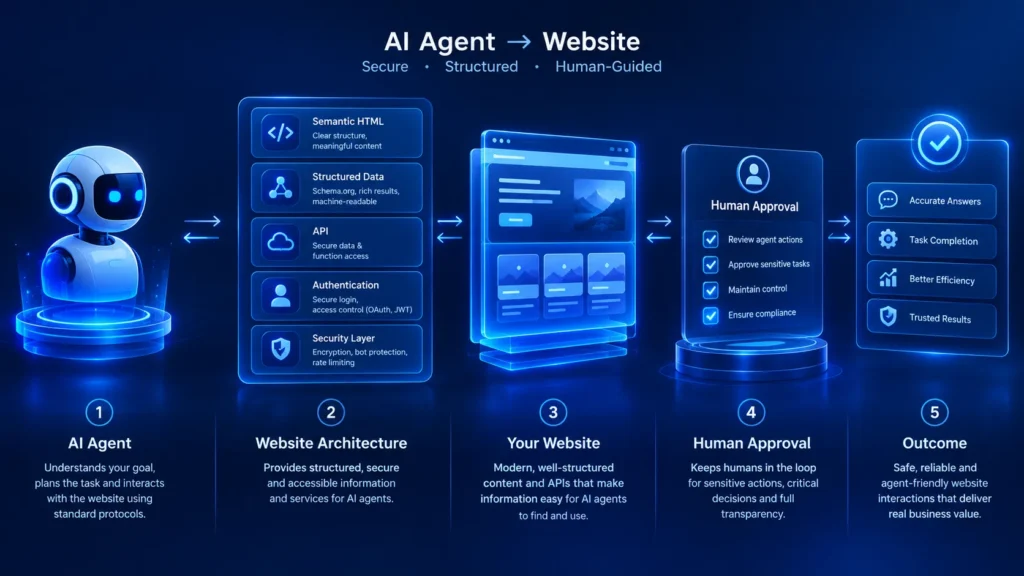
AI Agent → Understands Task → Prepares Action → Permission Check → Human Approval → Action Executed → Result Logged
21. Use Robots.txt Correctly
Robots.txt remains useful for communicating crawler access preferences. However, website owners should understand what it does and does not accomplish.
Do not treat robots.txt as an authentication mechanism.
For AI agent optimization, protect sensitive information with strong authentication and authorization—not assumptions that crawlers will follow a text file.
22. Create a Clear XML Sitemap
An XML sitemap helps search systems discover important URLs.
Keep your sitemap:
- Updated.
- Clean.
- Canonical.
- Free from unnecessary URLs.
- Free from broken pages.
- Organized appropriately for large websites.
A good sitemap is not an AI-agent API, but it contributes to discoverability.
23. Create an llms.txt or AI Guidance File Carefully
The emerging AI ecosystem has also created interest in files intended to help AI systems understand websites.
If you create an llms.txt file, use it as an additional documentation layer rather than treating it as a guaranteed control mechanism for every AI system.
A useful file could explain:
- What the website is.
- Important sections.
- Core services.
- Documentation.
- Contact information.
- Important policies.
- Key resources.
For example:
# Example Business

> Example Business provides web development and SEO services.

## Important Pages

- Services
- About
- Contact
- Documentation
- Blog

## Services

- Web Development
- SEO
- Digital Advertising
- IT Consultation
Keep such information accurate and updated.
24. Build an Agent-Friendly Content Architecture
Your content strategy should answer questions directly.
For every important page, consider including:
What is it?
A concise definition.
Who is it for?
The intended audience.
What does it do?
The primary purpose.
What does it include?
Features or components.
How does it work?
The process.
How much does it cost?
Pricing, if applicable.
What should the visitor do next?
A clear action.
This structure is useful for both humans and AI systems.
25. Use Tables for Comparable Information
Tables can make complex information easier to interpret.
| Feature | Basic Website | Agent-Friendly Website |
|---|---|---|
| Semantic HTML | Sometimes | Yes |
| Structured data | Limited | Strategic |
| Accessible forms | Variable | Required focus |
| APIs | Usually absent | Used where valuable |
| Clear actions | Yes | Explicit |
| Machine-readable content | Limited | Strong |
| Security boundaries | Standard | Agent-aware |
| Documentation | Limited | Recommended |
| Error handling | Basic | Structured |
| Human approval | Rare | Used for high-risk actions |
The objective is not to make every website unnecessarily complicated. Instead, implement capabilities according to the website’s purpose.
26. A Practical Agent-Friendly Website Creation Process
Here is a practical process businesses can follow.
Step 1: Audit the Website
Review:
- Navigation.
- URLs.
- HTML.
- Content.
- Forms.
- Images.
- Structured data.
- APIs.
- Security.
- Accessibility.
- Performance.
Step 2: Identify Important Information
Determine what an agent should understand.
For a service business, this could include:
- Services.
- Pricing.
- Locations.
- Opening hours.
- Contact information.
- Portfolio.
- FAQs.
For an e-commerce site:
- Products.
- Prices.
- Availability.
- Shipping.
- Returns.
- Reviews.
Step 3: Structure the Content
Convert important information into:
- Headings.
- Lists.
- Tables.
- Structured data.
- Clear paragraphs.
- FAQs.
Step 4: Improve Actions
- Review every important button.
- Replace vague labels with descriptive actions.
Step 5: Improve Forms
Add:
- Labels.
- Validation.
- Clear errors.
- Appropriate input types.
- Predictable submission behavior.
Step 6: Add Structured Data
Implement relevant Schema.org markup accurately.
Step 7: Create APIs Where Necessary
Expose useful information or functionality through secure endpoints when your business case justifies it.
Step 8: Secure Agent Access
Use:
- Authentication.
- Authorization.
- Rate limiting.
- Logging.
- Input validation.
- Permission boundaries.
Step 9: Test
Test the website using:
- Search crawlers.
- Accessibility tools.
- Browser automation.
- API clients.
- Human users.
- AI-assisted workflows.
Step 10: Monitor
Track:
- Errors.
- Failed tasks.
- API requests.
- Security events.
- Performance.
- Conversion rates.
Then improve continuously.
Agent-Friendly Website Architecture
A modern architecture can look like this:
                    USER
                      │
                      ▼
                AI ASSISTANT
                      │
            ┌─────────┴─────────┐
            ▼                   ▼
       WEBSITE CONTENT       WEBSITE API
            │                   │
            ▼                   ▼
     Structured Data       Authenticated Tools
            │                   │
            └─────────┬─────────┘
                      ▼
                BUSINESS LOGIC
                      │
              ┌───────┴───────┐
              ▼               ▼
           DATABASE        EXTERNAL SERVICES
              │               │
              └───────┬───────┘
                      ▼
               SECURITY LAYER
                      │
                      ▼
                HUMAN APPROVAL
              Where Required
This architecture separates information from actions and makes permissions easier to manage.
AI Agent Optimization vs Traditional SEO
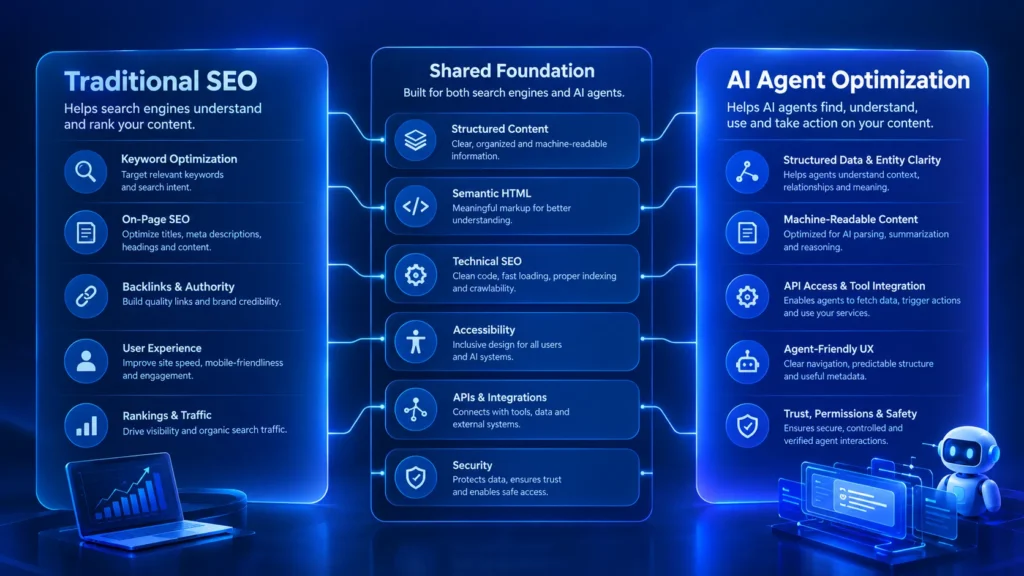
Traditional SEO is still important. Agent-friendly design does not replace SEO.
Instead, the two can complement one another.
| Area | Traditional SEO | AI Agent Optimization |
|---|---|---|
| Keywords | Important | Useful but contextual |
| Content | Search-focused | Clear and structured |
| Structured data | Valuable | Highly useful |
| Internal links | Important | Important |
| Semantic HTML | Recommended | Important |
| Accessibility | Important | Important |
| APIs | Not usually required | Useful for functionality |
| Clear actions | Conversion-focused | Machine + human clarity |
| Documentation | Useful | Very useful |
| Security | Essential | Essential |
| Page speed | Important | Important |
| FAQs | Useful | Useful |
| Machine-readable data | Helpful | Central concept |
The strongest strategy is not SEO versus AI agents.
It is a website architecture that supports both.
Benefits of Agent Friendly Websites
1. Better Machine Understanding
Clear structures help automated systems interpret your content.
2. Better Accessibility
Semantic HTML and properly labeled controls can improve accessibility.
3. Better User Experience
Clear navigation and actions reduce confusion.
4. Easier Automation
APIs and structured functionality can make automation more practical.
5. Better Content Reuse
Structured information can potentially be reused across applications and interfaces.
6. Easier Maintenance
Well-organized websites are generally easier for developers to maintain.
7. Stronger Technical Foundations
Many agent-friendly practices are simply good web engineering.
8. Future Readiness
As AI assistants and autonomous systems become more integrated with digital services, structured websites can provide a stronger foundation for future workflows.
Common Mistakes When Creating Agent Friendly Websites
Mistake 1: Designing Only for AI
- Do not sacrifice human usability.
- Your website still needs to serve people first.
Mistake 2: Adding Fake Structured Data
Structured data must accurately describe your content.
Mistake 3: Creating an API Without Security
An API should never automatically mean unrestricted access.
Mistake 4: Using Vague Buttons
“Click Here” provides little context.
Mistake 5: Hiding Important Information in Images
Critical information should generally exist as text.
Mistake 6: Overusing JavaScript
Client-side functionality is useful, but essential information should remain accessible.
Mistake 7: Ignoring Accessibility
Accessibility is part of robust web design.
Mistake 8: Giving Agents Too Much Permission
Automation should operate within clearly defined boundaries.
Mistake 9: Treating Robots.txt as Security
Robots.txt communicates crawler preferences. It does not protect confidential data.
Mistake 10: Forgetting Human Approval
High-impact actions should have appropriate confirmation and authorization mechanisms.
Agent-Friendly Website Checklist
Use this checklist before publishing or redesigning your website.
| Check | Completed |
|---|---|
| Clear navigation | ☐ |
| Descriptive URLs | ☐ |
| Semantic HTML | ☐ |
| Logical heading hierarchy | ☐ |
| Descriptive links | ☐ |
| Clear buttons | ☐ |
| Accessible forms | ☐ |
| Structured data | ☐ |
| XML sitemap | ☐ |
| Correct robots.txt | ☐ |
| Optimized images | ☐ |
| Fast loading | ☐ |
| Mobile responsive | ☐ |
| API where appropriate | ☐ |
| Authentication | ☐ |
| Authorization | ☐ |
| Rate limiting | ☐ |
| Error handling | ☐ |
| Security logging | ☐ |
| Human approval for sensitive actions | ☐ |
| Documentation | ☐ |
| Clear FAQs | ☐ |
| Regular testing | ☐ |
Recommended Tools and Technologies
You do not need every tool listed below. Choose according to your website.
Website Development
- WordPress
- HTML
- CSS
- JavaScript
- PHP
- React
- Next.js
Structured Data
- Schema.org
- JSON-LD
- Google Rich Results testing tools
Accessibility
- WCAG 2.2
- WAVE
- Lighthouse
- axe
Performance
- Lighthouse
- PageSpeed Insights
- CDN
- WebP/AVIF
- Browser caching
APIs
- REST APIs
- GraphQL
- OpenAPI documentation
Agent Connectivity
- Secure APIs
- Tool interfaces
- Model Context Protocol where appropriate
MCP is an open protocol designed to standardize how applications provide context to AI systems, making it relevant when building systems that connect agents with tools and data.
How 27 DIGI Can Help Build Agent Friendly Websites
Creating an agent-friendly website is not simply about installing a plugin.
It requires coordination between:
- Web development.
- Technical SEO.
- Content architecture.
- Performance.
- Accessibility.
- Security.
- APIs.
- User experience.
27 DIGI provides services that can support different parts of this process.
For businesses that need a technically strong website, explore 27 DIGI’s web development services.
For improving search visibility and technical discoverability, explore 27 DIGI’s SEO services.
Businesses planning more advanced digital infrastructure can also consider IT consultation and GET A QUOTE to determine how APIs, automation, integrations, and security should fit into the overall architecture.
The objective should be simple:
Build a website that people can use, search engines can understand, and authorized AI systems can interact with safely.
The Future of Agent Friendly Websites
The web is gradually becoming more interactive. Instead of simply visiting websites, people may increasingly ask AI systems to perform tasks across websites.
That could mean:
“Find a suitable service.”
Then:
“Compare the available options.”
Then:
“Check availability.”
Then:
“Prepare the order.”
Then:
“Ask me before purchasing.”
This workflow requires more than good content. It requires websites that expose reliable information, understandable interfaces, secure actions, and appropriate permissions.
That is why agent friendly websites are becoming an important concept in modern web development. The most useful approach is not to redesign everything around AI.
Instead, improve the fundamentals:
Semantic HTML + structured content + accessibility + APIs + security + clear actions + strong UX.
Those improvements benefit humans today while creating a stronger foundation for AI-assisted interactions tomorrow.
Final Takeaway
Creating agent friendly websites is ultimately about reducing ambiguity.
A human should know:
“What is this page?”
An AI agent should also be able to determine:
“What information is available here?”
A human should know:
“What can I do next?”
An agent should be able to determine:
“What actions are available, and what permissions are required?”
A human should understand:
“What happened?”
An automated system should also receive a clear result or error. This is the foundation of practical AI agent optimization.
The websites that prepare for this future will not necessarily be the ones with the most complicated AI technology. They may simply be the websites with the clearest information, strongest technical foundations, accessible interfaces, reliable APIs, and carefully controlled automation.
Build for people. Structure for machines. Secure the actions. Prepare for agents.
Frequently Asked Questions (FAQs)
What is an agent-friendly website?
An agent-friendly website is designed so AI agents and other automated systems can understand its content, navigate its structure, identify available actions, and interact with authorized functionality more reliably.
Why are agent friendly websites becoming important?
AI assistants are increasingly capable of searching information, using tools, navigating websites, and completing multi-step tasks. Websites with clear structures and machine-readable information can provide a better foundation for these interactions.
Does AI agent optimization replace SEO?
No. AI agent optimization complements SEO. Technical SEO, quality content, structured data, internal linking, performance, and accessibility remain important.
Do I need an API to create an agent-friendly website?
No. A simple informational website may not require an API. APIs become particularly useful when agents need to retrieve dynamic information or perform authorized actions.
Does structured data make a website agent-friendly?
Structured data can help machines interpret information, but it is only one component. Semantic HTML, clear content, accessibility, APIs, security, and good information architecture are also important.
Should every website create an llms.txt file?
Not necessarily. An AI-oriented documentation file can be useful as an additional resource, but it should not replace standard web architecture, structured data, documentation, security, or SEO.
Can AI agents safely use websites?
They can interact with websites, but automation introduces security risks. High-impact actions should use authentication, authorization, least-privilege access, validation, monitoring, and human approval where appropriate.
How can I test whether my website is agent-friendly?
Start by auditing navigation, semantic HTML, structured data, forms, accessibility, APIs, performance, documentation, security, and error handling. Then test realistic tasks using both human users and automated workflows.
Is agent-friendly design only for large companies?
No. Small businesses can benefit from the same principles. Clear navigation, semantic HTML, structured content, accessible forms, descriptive buttons, and good performance are useful for websites of any size.
What is the biggest mistake businesses make?
One common mistake is focusing on AI-specific features while ignoring the fundamentals. A fast, accessible, logically structured, secure website is a much stronger foundation than a visually impressive website with unclear information and poorly defined actions.