
Introduction to Multimodal and Visual Search Optimization
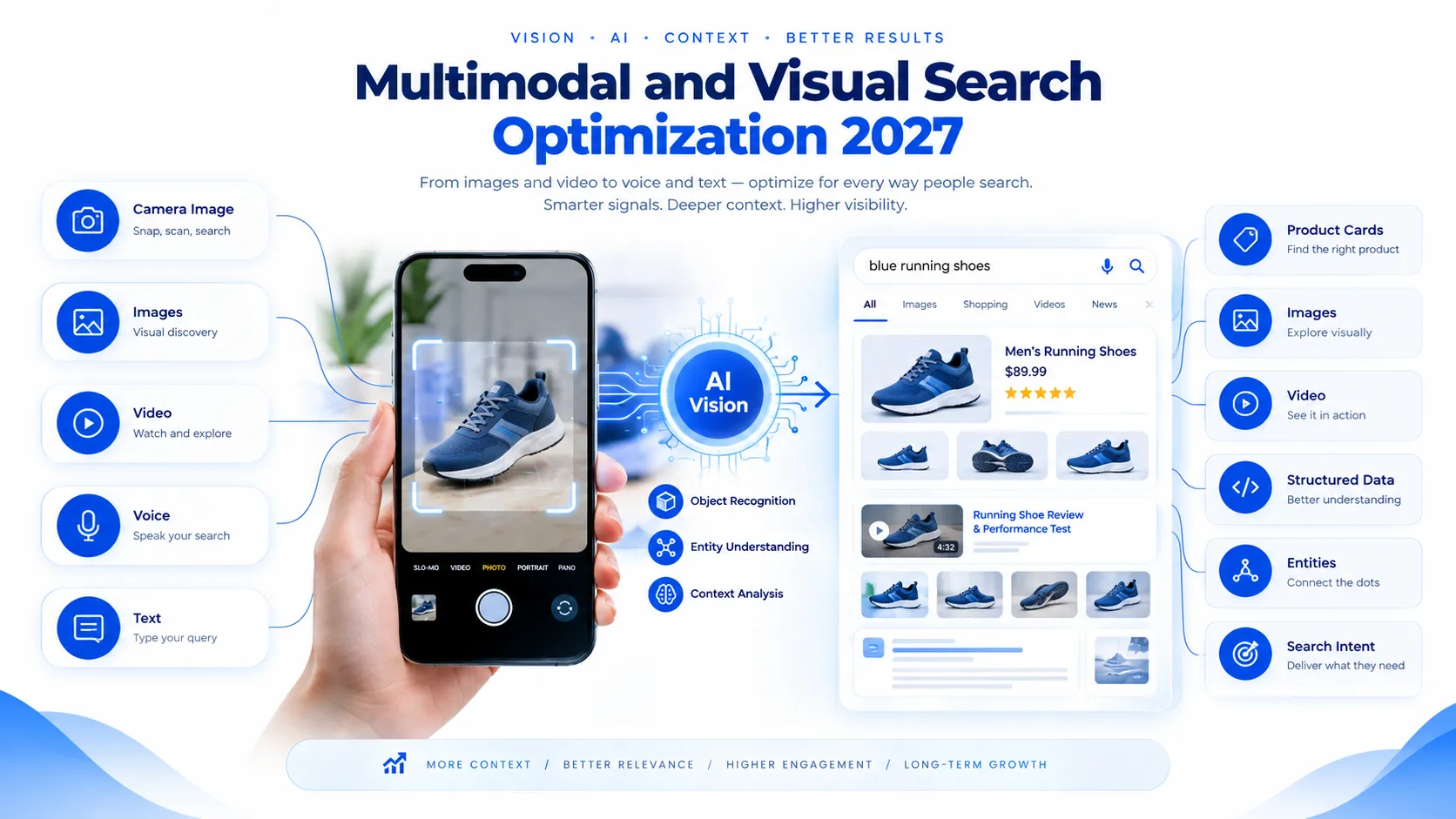
Search is becoming more visual, conversational, and context-aware. Users no longer rely only on keywords typed into a search box. They can upload photographs, use their cameras, speak questions, scan products, and combine images with text.
This shift creates a major opportunity for businesses.
Visual search optimization helps websites make their images easier for search systems to understand. Multimodal search SEO goes further by optimizing content for searches involving text, images, video, audio, and combinations of these formats.
Google already provides several ways for users to discover visual information. Google Images, Discover, Lens-related experiences, and product search all make visual content increasingly important. Google recommends descriptive image filenames, relevant surrounding content, crawlable image elements, responsive images, and strong image quality.
In 2027, successful SEO will not simply mean ranking a webpage. It will mean making your entire content ecosystem understandable.
That includes:
- Text
- Images
- Products
- Videos
- Graphics
- Locations
- Entities
- Structured data
- Brand information
- User intent
What Is Multimodal Search?
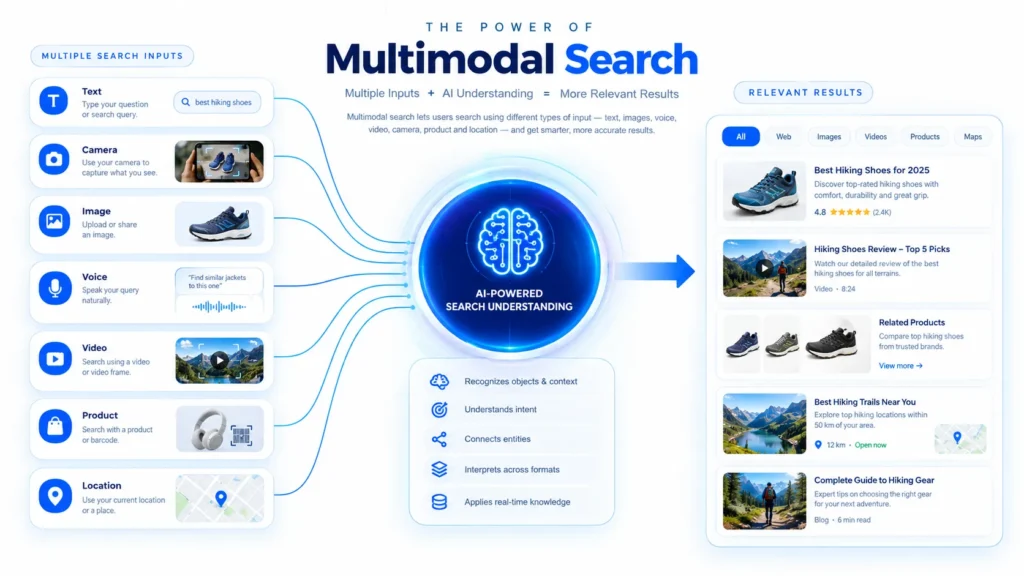
Multimodal search allows users to interact with search engines using multiple information formats.
Instead of typing:
“black running shoes”
A user could photograph a pair of shoes and ask:
“Where can I buy these?”
Another user could upload a furniture image and ask:
“Find similar products under $200.”
A multimodal system can combine the image with the written question. It can then interpret the visual object and the user’s intent together.
This is why multimodal search SEO is becoming an important part of modern search strategy.
Traditional SEO primarily focused on text relevance. Multimodal optimization requires a broader approach.
Your content should help machines understand:
- What the object is.
- What the image represents.
- Where it appears.
- Which brand owns it.
- What product or service it represents.
- What information surrounds it.
- What users can do next.
What Is Visual Search Optimization?
Visual search optimization is the process of improving images and visual content so search engines can discover, understand, associate, and display them for relevant searches.
It involves much more than adding alt text. A strong strategy includes:
- Descriptive image filenames
- Useful alt attributes
- Relevant captions
- Contextual surrounding text
- Crawlable image URLs
- Responsive image implementation
- Image compression
- Structured data
- Product information
- High-quality original imagery
- Consistent entity information
- Mobile optimization
Why Multimodal Search SEO Matters in 2027 ?
Search behavior is moving beyond simple keyword matching. People increasingly expect search systems to understand context.
For example, a customer might photograph a car.
They could then ask:
“What model is this?”
Then:
“What is its fuel average?”
Then:
“Find similar cars available near me.”
These are connected searches. The original image provides visual context. The follow-up question provides additional intent and this creates opportunities for businesses that organize their content properly. (Google Image SEO Best Practices)
The Search Evolution
| Traditional Search | Modern Multimodal Search |
|---|---|
| Text query | Text + image |
| Keywords | Context + entities |
| Webpage results | Images + products + answers |
| Desktop focused | Mobile and camera focused |
| Text-heavy content | Mixed media |
| Keyword matching | Intent understanding |
| Static search journey | Interactive search journey |
The important lesson is simple.
Your images should become searchable assets.
The Key Benefits of Visual Search Optimization
There is more to visual search optimization than appearing in image results. A properly optimized visual strategy can strengthen multiple areas of digital marketing.
1. Increased Image Discoverability
- Optimized images have a better chance of being discovered through image-based search experiences.
- Google recommends descriptive filenames, useful alt text, relevant page context, and high-quality images.
2. More Product Discovery
- E-commerce websites can benefit significantly.
- A user may discover a product through an image instead of a traditional product keyword.
3. Better User Experience
- Fast, responsive images improve usability.
- Users should not wait several seconds for an oversized image to appear.
4. Stronger Content Context
- Images can reinforce the subject of your webpage.
- A page about hiking boots becomes stronger when its images, captions, filenames, product information, and surrounding text all describe the same subject.
5. Greater Search Surface Area
One piece of content can potentially appear through multiple discovery paths.
These can include:
- Web search
- Image search
- Product results
- Discover
- Video search
- Visual search experiences
- AI-powered search interfaces
This is one reason multimodal search SEO deserves a place in your 2027 strategy.
How Multimodal Search Works
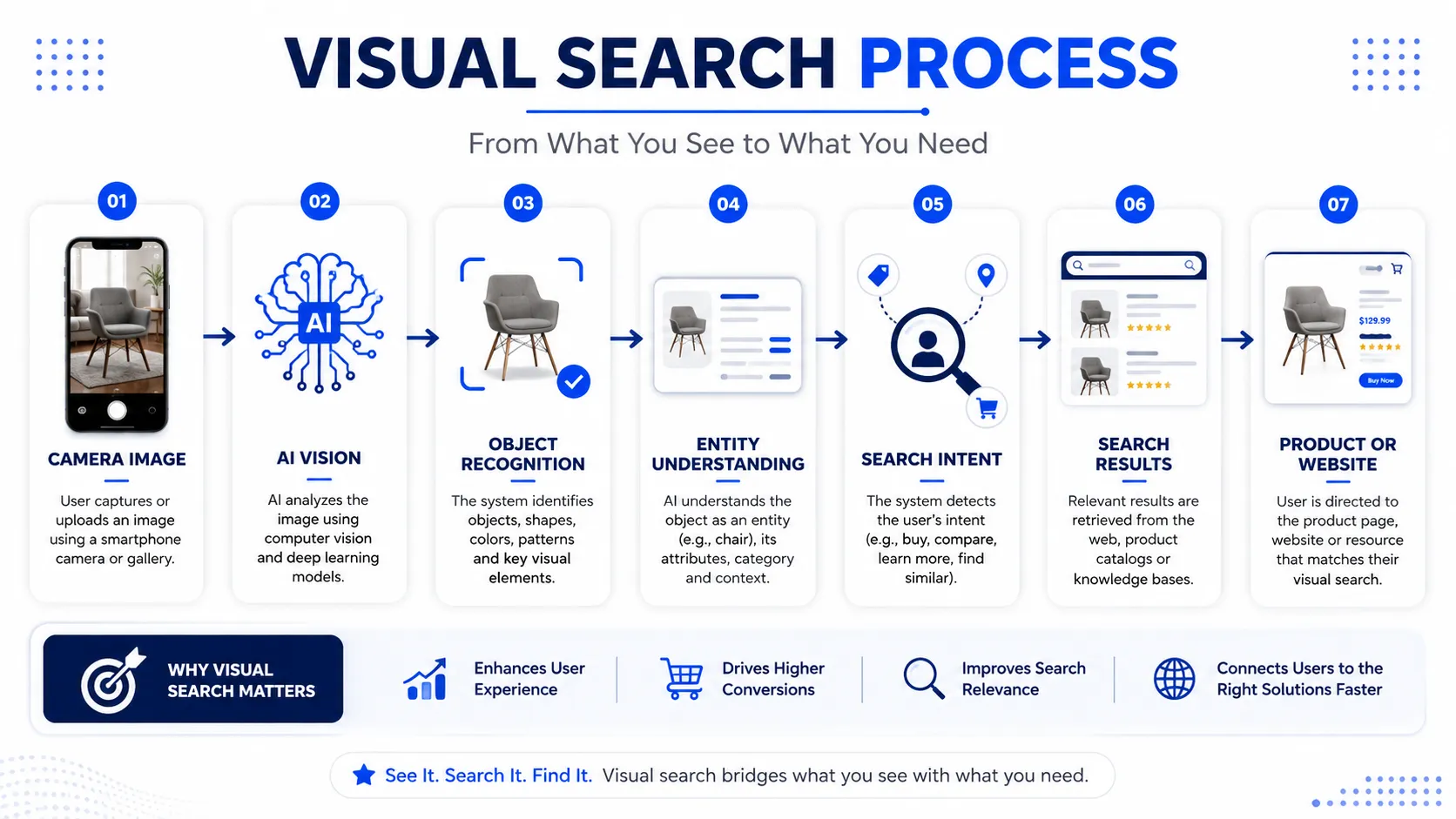
Multimodal systems attempt to understand different types of information together.
A simplified process looks like this:
USER INPUT
↓
IMAGE + TEXT + VOICE
↓
VISUAL / LANGUAGE UNDERSTANDING
↓
OBJECT + ENTITY IDENTIFICATION
↓
INTENT UNDERSTANDING
↓
RELEVANCE + CONTEXT
↓
SEARCH RESULTS
↓
PRODUCT / PAGE / ANSWER
Visual search systems can analyze objects and visual features. Microsoft’s explanation of Bing Visual Search describes image understanding processes such as object detection and visual feature extraction.
This means your optimization strategy should provide clear signals around every important visual asset.
Visual Search Optimization vs Traditional SEO
Traditional SEO remains essential but Visual optimization does not replace keyword research, technical SEO, content quality, or backlinks.
Instead, it expands SEO.
| SEO Element | Traditional SEO | Visual / Multimodal SEO |
|---|---|---|
| Keywords | Important | Still important |
| Images | Supporting element | Primary search asset |
| Alt text | Accessibility + context | Important image signal |
| Filename | Minor signal | Useful descriptive context |
| Structured data | Content understanding | Product/image understanding |
| Video | Supporting media | Searchable content asset |
| Product data | Important | Extremely important |
| Mobile | Essential | Critical |
| Context | Text-based | Text + visual context |
| Entities | Increasingly important | Central to understanding |
How to Optimize Images for Visual Search
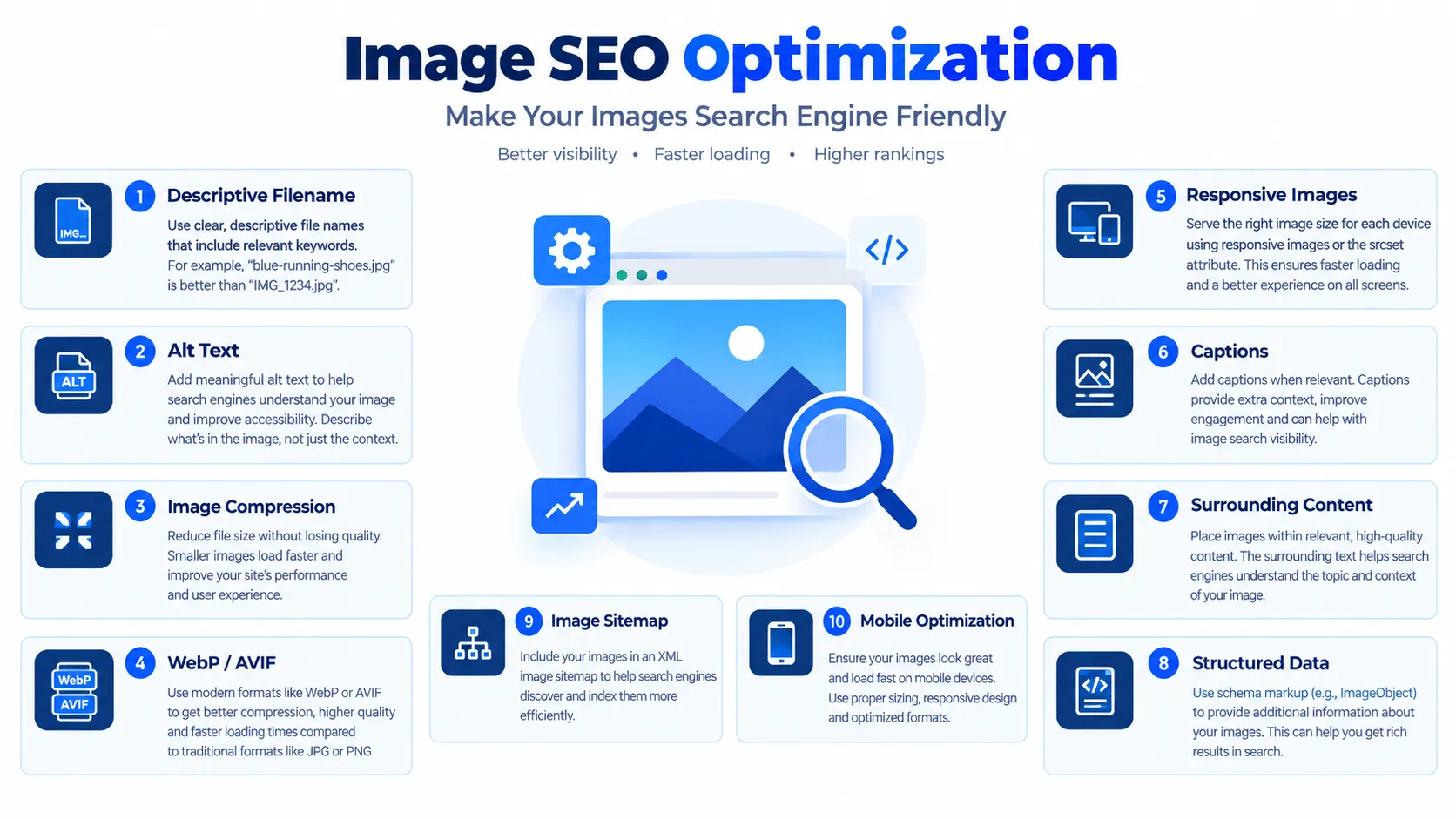
A strong visual search optimization strategy begins with image fundamentals.
1. Use Descriptive File Names
Avoid:
IMG_8392.jpg DSC00931.png image-final-new.jpg
Instead use:
black-running-shoes-mens.jpg
Descriptive filenames provide useful contextual clues.
2. Write Useful Alt Text
Alt text should describe the image naturally.
Poor example:
shoes SEO running buy cheap shoes best shoes
Better example:
black men’s running shoes with cushioned sole
Do not turn alt text into keyword stuffing. Accessibility should remain the priority.
3. Add Relevant Captions
Captions can help users understand an image. They also create additional contextual information around visual assets.
4. Place Images Near Relevant Content
- An image about electric vehicles should appear near relevant electric vehicle content.
- Avoid placing unrelated images randomly throughout a page.
5. Use Original Visuals
- Original photographs, diagrams, product images, and branded graphics can help differentiate your website.
- Stock photography often provides less unique value.
Image Compression and Performance
Image quality matters but large images can slow down websites.
This creates a balance between:
Quality + Dimensions + File Size + Format
Google recommends optimizing images for both speed and quality. It also supports common formats including JPEG, PNG, WebP, SVG, GIF, BMP, and AVIF.
Recommended Image Workflow
Original Image → Resize → Crop → Compress → Convert to WebP/AVIF → Add Alt Text → Add Descriptive Filename → Implement Responsive Image → Test Performance
Practical Compression Table
| Image Type | Recommended Approach |
|---|---|
| Hero image | WebP/AVIF + responsive sizing |
| Product image | High quality + compressed |
| Thumbnail | Smaller dimensions |
| Infographic | Optimized PNG/WebP |
| Decorative image | Aggressive compression |
| Logo | SVG when appropriate |
| Mobile image | Responsive variant |
Use tools such as PageSpeed Insights to identify performance problems.
Structured Data for Visual Search
Structured data provides search engines with explicit information about page content.
For visual and multimodal strategies, structured data can become particularly useful for:
- Products
- Reviews
- Recipes
- Articles
- Events
- Organizations
- Local businesses
- Images
- Videos
For product websites, Product structured data can communicate information such as price, availability, reviews, shipping, and other product details.
Example Product Context
A product page could connect:
Product Name → Product Image → Brand → Description → Price → Availability → Reviews → Product URL
Remember that structured data does not guarantee a particular search appearance. Google explicitly states that valid structured data does not guarantee rich-result display.
Image Metadata and Licensing
Image metadata is another area businesses should understand.
For publishers, photographers, designers, and agencies, this is especially useful.
Consider documenting:
- Creator
- Copyright holder
- License
- Credit
- Usage rights
- License URL
This also improves transparency around original visual content.
Video and Multimodal Content Optimization
Multimodal SEO does not stop with photographs. Video is another major visual asset.
A strong video strategy should include:
- Descriptive titles
- Useful descriptions
- Relevant transcripts
- Captions
- Strong thumbnails
- Structured data where appropriate
- Relevant surrounding webpage content
- Clear chapters
- Consistent entity references
For example,
- A product tutorial should mention the exact product name.
- The webpage should contain the same product information.
- The video title should remain consistent.
- The thumbnail should visually represent the subject.
- This creates consistency across multiple modalities.
Entity, Context, and Semantic Signals
One of the biggest mistakes is optimizing an image in isolation. Search systems need context.
Imagine an image showing a red sports car. The image alone may provide limited information.
Now surround it with:
2027 electric sports car
Brand name
Model name
Battery range
Performance specifications
Product page
Expert review
Related videos
The visual asset becomes much easier to associate with a specific entity. This is where multimodal search SEO overlaps with entity SEO.
Every important visual should answer:
- What is this?
- Who created it?
- What brand does it represent?
- What page does it belong to?
- What topic does it support?
- What user intent does it satisfy?
Mobile Optimization for Visual Search
Mobile optimization is essential because cameras make visual search extremely convenient.
A user can photograph:
- Shoes
- Cars
- Buildings
- Food
- Furniture
- Clothing
- Electronics
- Plants
- Products
Then immediately search for information.
Therefore, your visual assets should work properly on smaller screens.
Use:
- Responsive images
- Proper
srcset - Flexible layouts
- Fast image delivery
- Touch-friendly interfaces
- Compressed media
- Mobile-first design
A Step-by-Step Multimodal Search SEO Process
Step 1: Audit Existing Visual Content
Start by identifying every important image, video, infographic, and product asset.
Check:
- File names
- Alt text
- Dimensions
- File size
- Formats
- Page context
- Indexability
- Structured data
Step 2: Identify Visual Search Opportunities
Find pages where users naturally need visual information.
Examples include:
- E-commerce
- Travel
- Fashion
- Automotive
- Food
- Home design
- Real estate
- Beauty
- Technology
- Manufacturing
Step 3: Build Visual Keyword Maps
Connect keywords with visual assets.
| Search Intent | Visual Asset |
|---|---|
| Product discovery | Product photo |
| How-to | Diagram |
| Comparison | Comparison graphic |
| Location | Map/photo |
| Recipe | Food image |
| Fashion | Outfit image |
| Tutorial | Video |
| Specification | Infographic |
Step 4: Optimize Image Assets
- Rename files.
- Write useful alt text.
- Compress images.
- Add captions where useful.
- Use responsive formats.
Step 5: Improve Page Context
Place visual assets near relevant text.
Connect images with:
- Headings
- Product descriptions
- Captions
- Internal links
- Entity information
Step 6: Implement Structured Data
- Add relevant structured data.
- Validate implementation using Google’s testing tools.
Step 7: Improve Performance
- Test mobile performance.
- Reduce unnecessary image weight.
- Use caching and modern image delivery.
Step 8: Monitor Results
Track:
- Image impressions
- Image clicks
- Organic traffic
- Product visibility
- Conversions
- Engagement
- Page performance
Step 9: Update Continuously
- Visual SEO is not a one-time project.
- New products require new images.
- New content requires new visual assets.
- New search behaviors require new optimization.
Common Visual Search SEO Mistakes
1. Using Generic Image Names
IMG1234.jpggives little useful context.- Use descriptive names instead.
2. Keyword Stuffing Alt Text
- Alt text should describe the image.
- Do not turn it into a keyword list.
3. Using Huge Images
- Large files can damage page performance.
- Compress them before publishing.
4. Ignoring Mobile Users
- Visual search is highly compatible with mobile behavior.
- Your visual experience should therefore work smoothly on smartphones.
5. Using Images Without Context
An image should support the page topic.
6. Forgetting Product Structured Data
E-commerce websites should provide clear product information.
7. Relying Only on Stock Images
Original visuals can provide stronger differentiation.
8. Blocking Image Crawling
Search engines need access to your image resources.
9. Ignoring Image Sitemaps
Large websites can benefit from image sitemaps. This can help search engines discover images that might otherwise be difficult to find.
Tools for Multimodal and Visual Search Optimization
| Tool | Main Purpose |
|---|---|
| Google Search Console | Search performance |
| Google Images | Visual discovery testing |
| PageSpeed Insights | Performance |
| Lighthouse | Technical auditing |
| Rich Results Test | Structured data testing |
| Screaming Frog | Technical crawling |
| SEMrush | SEO research |
| Ahrefs | Keywords and backlinks |
| Bing Visual Search | Visual search testing |
| Image compression tools | File optimization |
Measuring Visual Search Performance
Tracking visual SEO requires more than checking traditional rankings.
Create a monthly dashboard containing:
| Metric | What It Shows |
|---|---|
| Image impressions | Visual visibility |
| Image clicks | Search interest |
| Organic sessions | Website traffic |
| Product clicks | Commercial intent |
| Conversion rate | Business impact |
| Image load time | Performance |
| LCP | Loading experience |
| Mobile traffic | Visual mobile demand |
| Indexed images | Crawlability |
| Image errors | Technical issues |
A useful reporting model is:
VISIBILITY → IMPRESSIONS → CLICKS → LANDING PAGE VISITS → ENGAGEMENT → CONVERSIONS → REVENUE
- The objective is not simply to get images indexed.
- The objective is to turn visual discovery into measurable business value.
2027 Visual Search SEO Trends
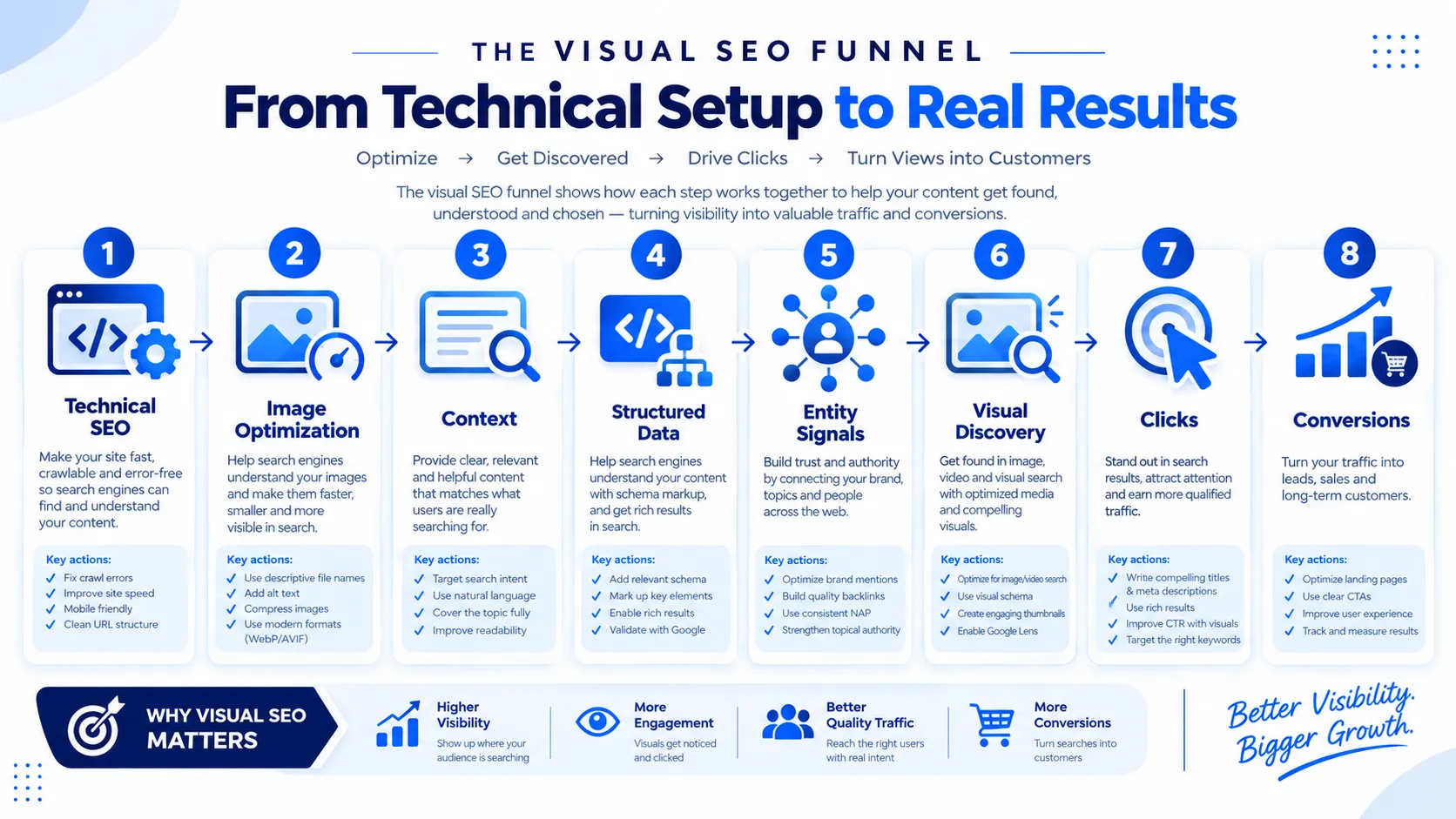
1. Camera-Based Discovery
Mobile cameras will remain a major entry point for visual discovery.
2. Image + Text Queries
Users will increasingly combine photographs with questions.
3. Product Identification
Consumers can discover products from photographs instead of product names.
4. AI-Assisted Visual Understanding
Search systems will become increasingly capable of connecting visual information with textual intent.
5. More Visual Commerce
Retailers should prepare for image-led product discovery.
6. Stronger Entity Connections
Brands, products, locations, and people will need consistent information across formats.
7. More Interactive Search
Search experiences are moving from static results toward conversational exploration.
Microsoft’s 2026 Bing Image Search developments already demonstrate this direction, with AI-assisted organization and summaries designed to help users explore image results more effectively.
This makes multimodal search SEO an important preparation strategy for 2027.
How 27 DiGi Can Help With Visual and Multimodal SEO
Implementing a complete visual search strategy requires technical SEO, content optimization, web development, performance work, and visual design.
That is where an integrated approach becomes valuable.
At 27 DiGi, SEO services can cover keyword research, on-page optimization, content creation, technical SEO, local SEO, link building, reporting, and ongoing optimization.
Their web development services also include responsive layouts, SEO optimization, e-commerce solutions, CMS integration, and performance optimization.
For businesses building a visual-first website, these services can work together.
A strong internal-link structure can connect your technical SEO, web development, visual content, and digital marketing services.
Want to grow and reach new heights. Contact us and get a quote NOW.
Final Thoughts
Search is no longer limited to ten blue links.
- People search with words.
- They search with photographs.
- They search with videos.
- They search with voice.
They combine different formats to explain what they want. That is the core reason visual search optimization deserves greater attention in 2027.
Businesses should begin treating images as searchable content assets rather than decoration.
- Every important image should have a purpose.
- Every product image should communicate useful information.
- Every video should support a clear search intent.
- Every visual should connect to the surrounding page.
At the same time, multimodal search SEO should become part of the wider SEO strategy. The strongest websites will combine technical SEO, useful content, structured data, strong entities, fast performance, original visuals, and clear user intent.
The goal is not to optimize for machines alone.
The goal is to make your content understandable to both people and modern search systems.
- Start with your most important pages.
- Audit their images.
- Improve filenames.
- Rewrite weak alt text.
- Compress oversized files.
- Add relevant structured data.
- Improve page context.
Then measure the results. The future of search is increasingly visual. Businesses that prepare early can build a stronger foundation for the next generation of organic discovery.
Frequently Asked Questions (FAQs)
What is visual search optimization?
Visual search optimization is the process of improving images so search engines can discover, interpret, index, and associate them with relevant content. It includes descriptive filenames, useful alt text, image context, structured data, responsive implementation, compression, and high-quality visual assets.
What is multimodal search SEO?
Multimodal search SEO focuses on optimizing content for search experiences that combine multiple formats. These can include text, images, video, voice, products, and other contextual signals. The goal is to make content understandable across different search inputs.
Why is visual search optimization important for 2027?
Visual search provides another discovery path beyond traditional keyword searches. Consumers can use cameras and images to identify products, places, objects, and other information. Businesses with strong visual content can therefore create additional opportunities for discovery.
How do I optimize images for visual search?
Start with descriptive filenames and useful alt text. Compress images without damaging quality. Use responsive images and relevant captions. Place images near related content. Make sure search engines can crawl them. Add appropriate structured data where applicable.
Does image alt text improve SEO?
Alt text primarily helps describe images for accessibility and provides useful context. It should accurately describe the image instead of being stuffed with keywords. Google also considers information from the page surrounding the image when determining its subject.
Does image compression affect visual SEO?
Compression can improve website performance when it reduces unnecessary file weight while preserving acceptable quality. Google recommends optimizing images for both speed and quality.
Is structured data useful for visual search?
Yes, where appropriate. Structured data gives search engines explicit information about webpage content. Product structured data can help product information appear in richer search experiences, including Google Images and Google Lens-related experiences.
Should every website invest in multimodal SEO?
Not every website needs the same level of investment. E-commerce, automotive, fashion, travel, food, real estate, home design, and visually driven businesses may benefit especially strongly. Other businesses can begin with basic image optimization and expand gradually.
Can visual search replace traditional SEO?
No. Visual optimization complements traditional SEO. Technical SEO, useful content, internal links, keyword research, authority, accessibility, and strong user experience remain important. Visual search should become another part of a broader search strategy.
How often should I audit my visual SEO?
A quarterly audit is a practical starting point. Large e-commerce websites should consider more frequent checks because products, images, URLs, and inventory can change rapidly. Always review visual SEO after major website redesigns or technical migrations.